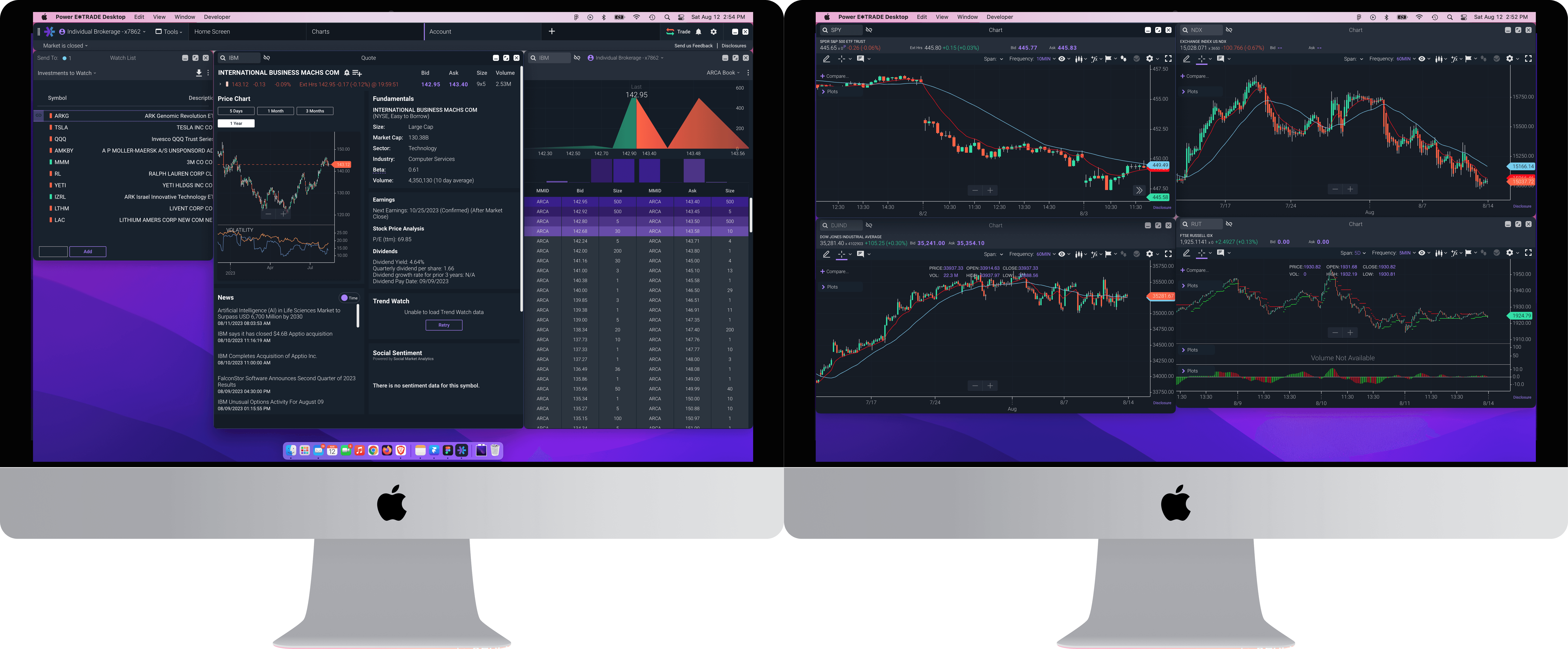
Turning a best-in-class trading experience on the web into a multi-window, multi-monitor native desktop solution

Turning a best-in-class trading experience on the web into a multi-window, multi-monitor native desktop solution

Turning a best-in-class trading experience on the web into a multi-window, multi-monitor native desktop solution

Power E*Trade Desktop: Platform

Power E*Trade Desktop: Platform

UX/UI Design

User Flows

User Research

User Testing

Prototyping

Team

1 Designer, 2 Project Managers, 2 Developers, 3 QA

Year

2020-2021

Challenge

Power E*Trade offered highly-rated web and mobile experiences for the active trader user base, but was missing a modern native desktop platform offering for advanced users who needed multi-monitor support, increased performance, and deeper customization. How do we bridge that product gap?

What E*Trade did offer, was E*Trade Pro - a very sophisticated and powerful, but extremely outdated, native desktop app. It ceased being marketed to new customers, but has been maintained for a subset of Active Platinum Traders to continue trading on. The activity of these roughly 50,000 accounts for roughly 1/5 of all trading revenue at E*Trade. From expiring vendor licenses to the cost of upkeeping with security and regulation updates, it was decided to sunset the product. The question at hand was - How do we draw down Pro while retaining the business of these highly opinionated users?

Power E*Trade offered highly-rated web and mobile experiences for the active trader user base, but was missing a modern native desktop platform offering for advanced users who needed multi-monitor support, increased performance, and deeper customization. How do we bridge that product gap?

What E*Trade did offer, was E*Trade Pro - a very sophisticated and powerful, but extremely outdated, native desktop app. It ceased being marketed to new customers, but has been maintained for a subset of Active Platinum Traders to continue trading on. The activity of these roughly 50,000 accounts for roughly 1/5 of all trading revenue at E*Trade. From expiring vendor licenses to the cost of upkeeping with security and regulation updates, it was decided to sunset the product. The question at hand was - How do we draw down Pro while retaining the business of these highly opinionated users?

Goal

We want to build a modern, customizable trading platform that meets the specific needs of our most valuable active traders, while leveraging the architecture that already exists.

We want to build a modern, customizable trading platform that meets the specific needs of our most valuable active traders, while leveraging the architecture that already exists.

The vision was to build a platform that was capable of infinite customization across multiple displays
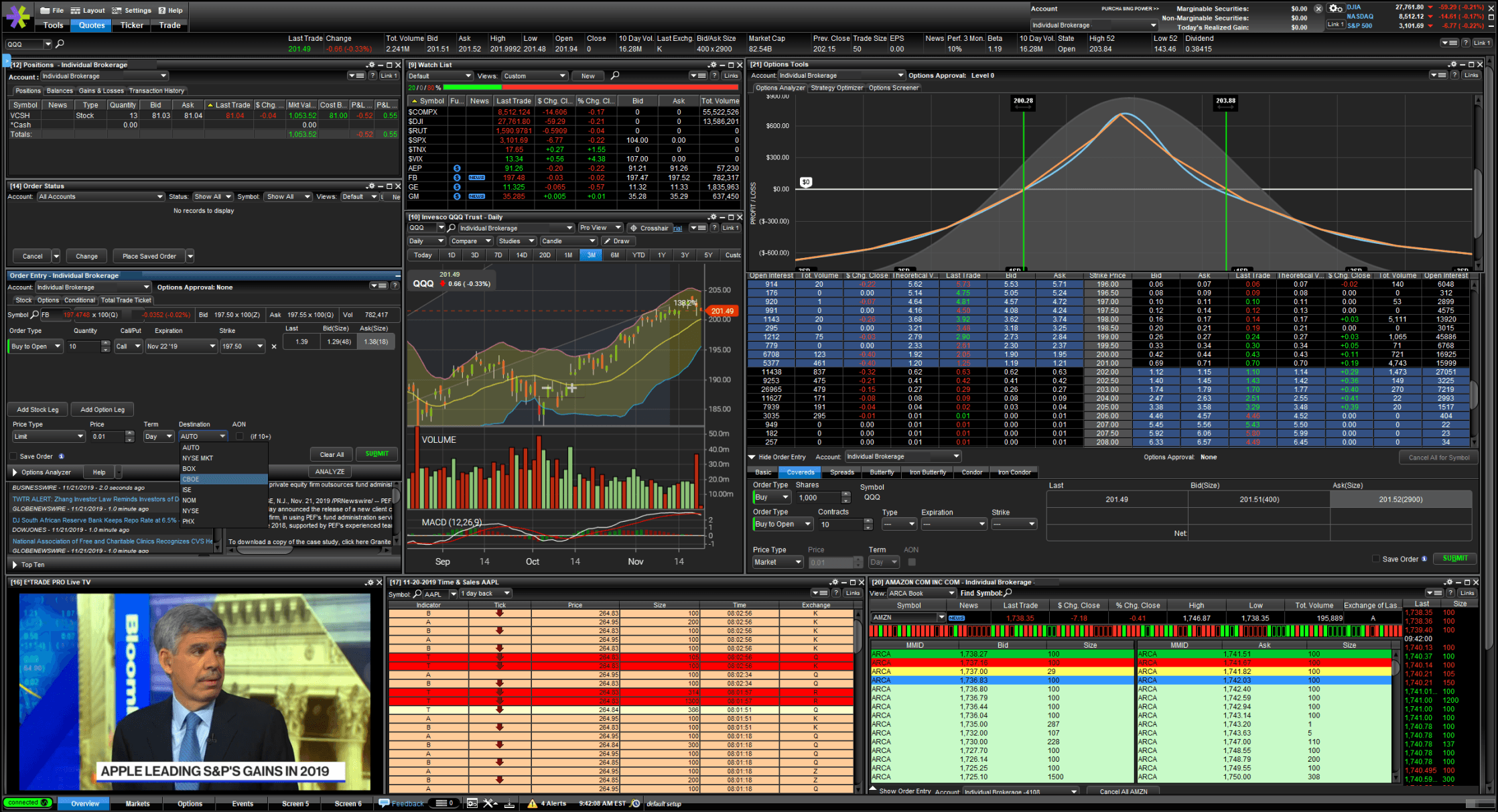
E*Trade Pro, a single-window desktop application containing modular tool windows

Power E*Trade, a web-browser based platform with a tabbed navigation of pages

Empathize,
Define

Empathize, Define

First, Pro users participated in interviews and contextual inquiries to understand their needs and pain points throughout their trading day. This helped us understand these were users with very specific and varied approaches to reaching the goal of placing successful trades, and their needs required a platform that allowed complete customization over the trading experience. Users were asked to rank the features and tools on Pro that they valued most, helping us understand what aspects of the experience were most critical. We also asked if they had tried the Power E*Trade web experience, and what was missing that experience that kept them from moving to a more modern platform.

We also met with current Power E*Trade users, to find out what pain points in the web experience could be resolved by a more robust native desktop experience. After synthesizing these insights, they were used to drive and prioritize the product roadmap and our project milestones, as well as help define our design principles.

Who are active traders?

Who are active traders?

Goals

  • To reach financial freedom faster with a steady stream of trading income

  • Develop investment and trading skills

  • Become a better investor through hands-on practice

  • Get consistent above-average returns relative to his benchmark and grow assets over time

Needs

  • Powerful trading platform with up-to-date, streaming quotes

  • High-quality resources and quick support

  • Performance reporting

Pain Points

  • Disruption to trading routine

  • Unexpected changes to website features or trading platform, including site outages

  • Slow data or platform performance

  • Bad fills / order executions

Attitudes

  • Follows the market very actively

  • Sophisticated, systematic, and serious in investing approach

  • Information hungry - enjoys learning about new investment trends and strategies

Financial Profile

  • 50 - 1,000 trades per quarter

  • $100k to $10M in brokerage account value

  • Instruments / strategies traded:

    • Stocks / ETFs

    • Futures

    • Options & advanced options strategies

    • Crypto

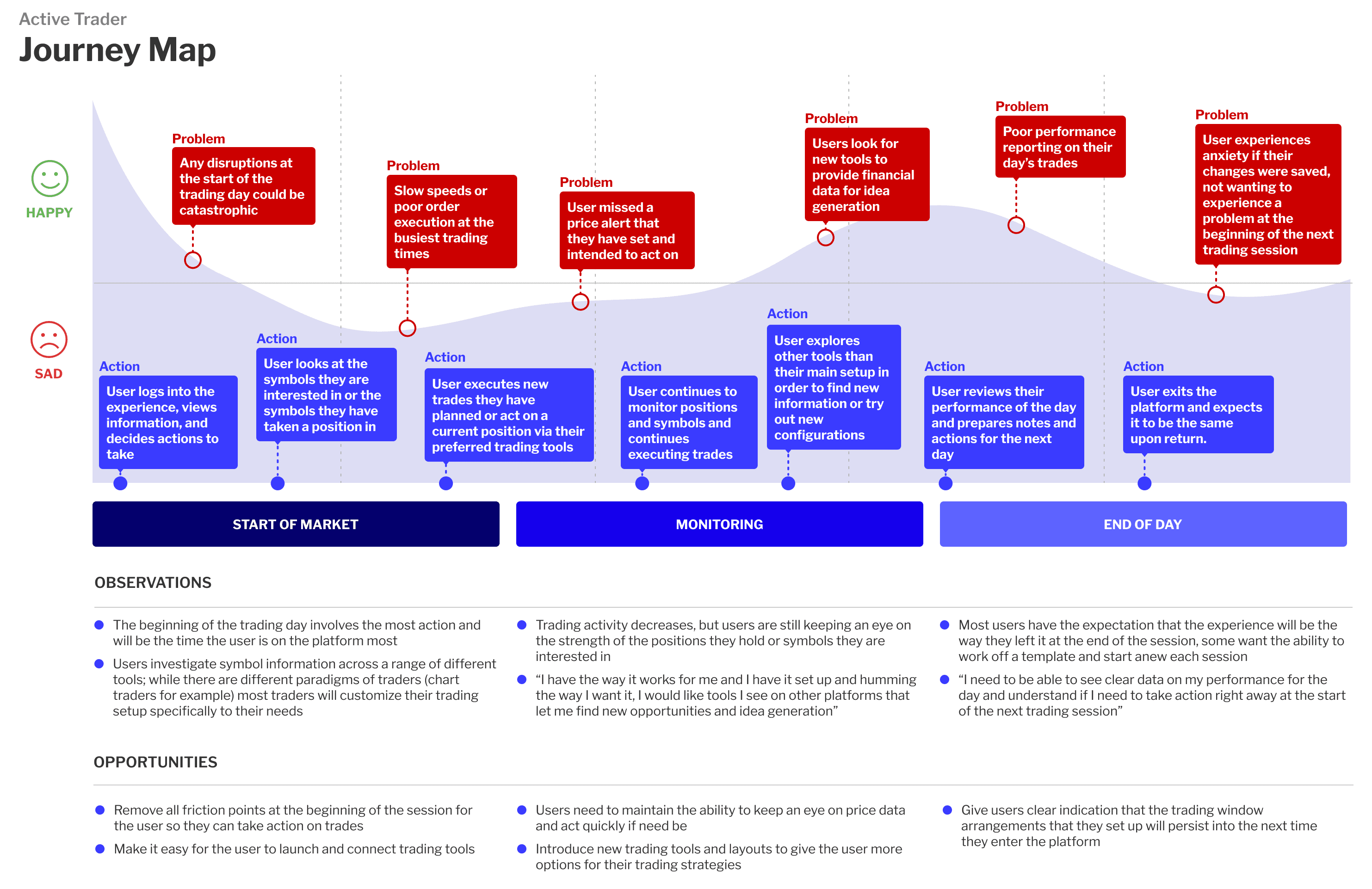
Understanding the Active Trader journey

Understanding the
Active Trader journey

Design Principles

Design Principles

Design Principles

Tailoring

Tailoring

Users need to feel empowered to create the exact trading experience that suits their needs without constraints, with just enough bumpers in place for a smooth cohesive user experience.

Speed

Speed

In this domain, milliseconds can make the difference between a gain and a loss, so performance for our users is paramount. What we build has to be able to handle a large amount of realtime streaming data across several tools and displays, across all user devices.

Intuitition

Intuitition

While the mechanics and understanding of trading tools can be complex and intimidating, we want a platform that the user can set up and use without needing to read a lengthy user manual.

Inertia

Inertia

Anything that could slow a user’s momentum during the trading session should be removed as much as possible. Users shouldn’t have to continuously set up their order ticket preferences manually, or be blocked by error states.
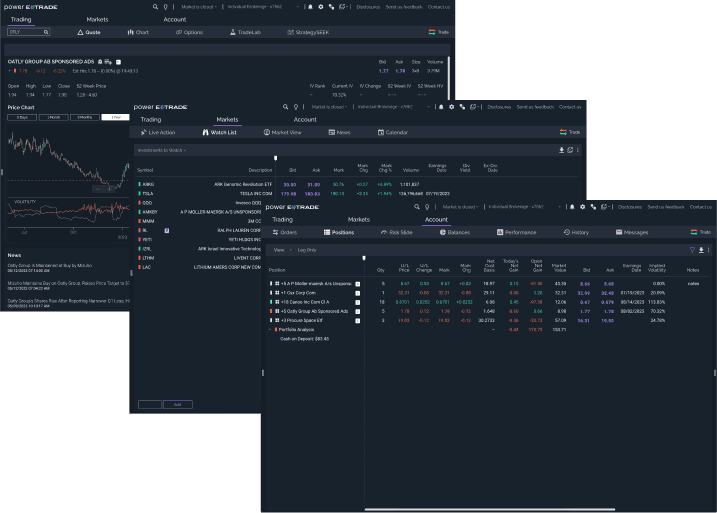
Pages accessible via tabs for Chart, Watch List, and Positions in the Power E*Trade web experience
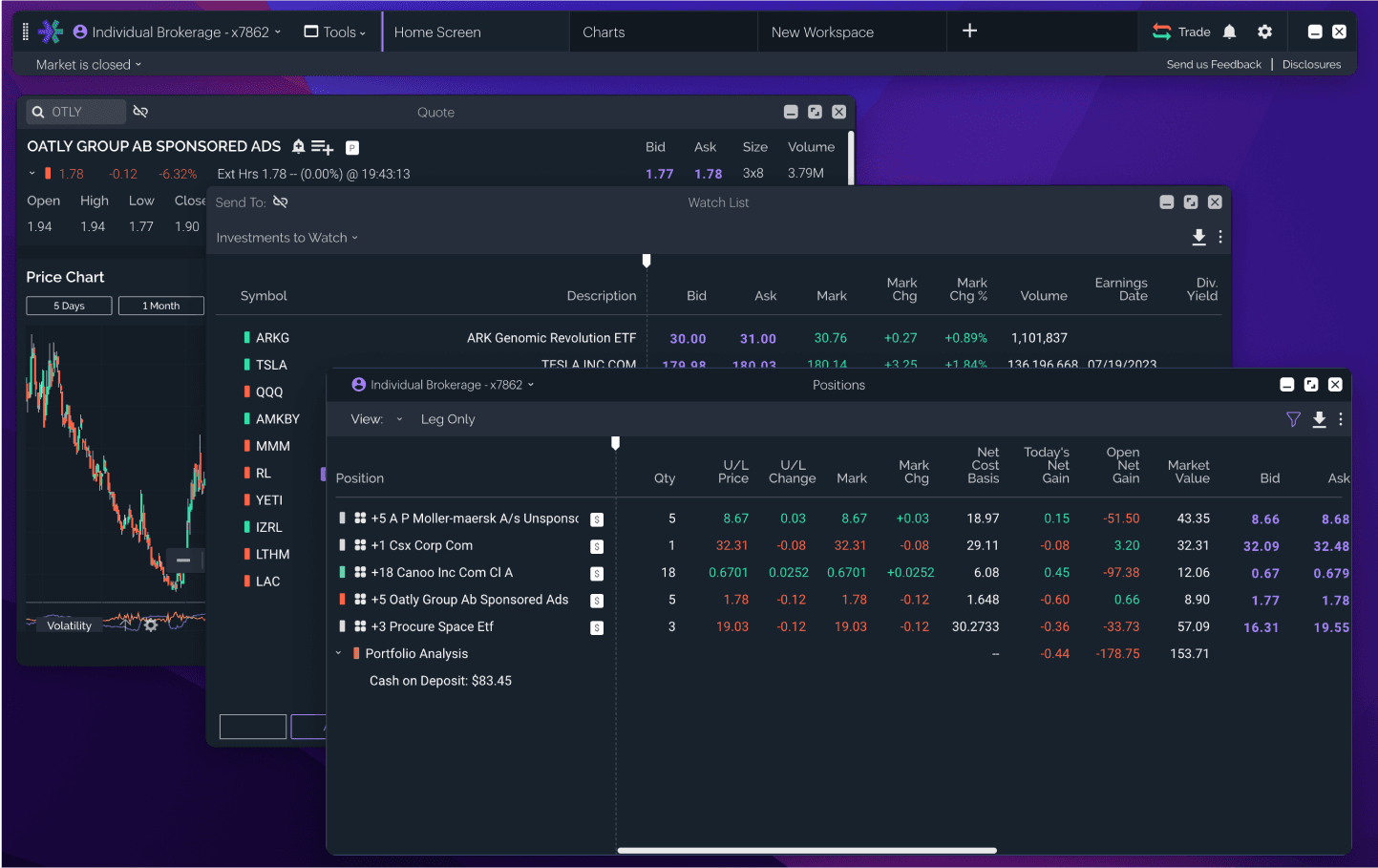
Independent tool windows for Chart, Watch List, and Positions in the Power E*Trade desktop experience

At the same time design and product worked closely with our tech partners to create a proof-of-concept - could we leverage Electron to create a native desktop application that could take the different pages within the Power E*Trade web experience and launch them each as independent window modules? After confirming the validity of our concept, we set out to evolve and define the experience by:

  • Working on the core platform UX


  • Improving the experience of using existing tools now in the context of a multi-window workspace


  • Creating net-new trading tools as well as achieving parity with the tool offerings on Pro

At the same time design and product worked closely with our tech partners to create a proof-of-concept - could we leverage Electron to create a native desktop application that could take the different pages within the Power E*Trade web experience and launch them each as independent window modules? After confirming the validity of our concept, we set out to evolve and define the experience by:

  • Working on the core platform UI


  • Improving the experience of using existing tools now in the context of a multi-window workspace


  • Creating net-new trading tools as well as achieving parity with the tool offerings on Pro

Power E*Trade web navigation bar

Power E*Trade desktop menu bar

Instead of using a single view with tabbed navigation to view pages, the desktop app launches single window instances from a tool menu
When we designed the desktop experience, our initial approach was to “decouple” the web navigation and turn it into a powerful free floating menu bar that would drive the experience. What we heard from user testing is that the navigation should take up as little space as possible in order to maximize the area available for users to arrange tools and information. The new menu bar would:

  • Be a responsive component that allowed users to create and quickly switch between different Workspaces where they could launch and arrange tool windows

  • Utilize a new global account selector that drove the account experience across multiple disparate child windows

  • Have the web navigation now contained within a new “Tools” launch menu

  • Include the quick launch features for trade tickets, alerts, and settings that web users were accustomed to

When we designed the desktop experience, our initial approach was to “decouple” the web navigation and turn it into a powerful free floating menu bar that would drive the experience. What we heard from user testing is that the navigation should take up as little space as possible in order to maximize the area available for users to arrange tools and information. The new menu bar would:


  • Be a responsive component that allowed users to create and quickly switch between different Workspaces where they could launch and arrange tool windows

  • Utilize a new global account selector that drove the account experience across multiple disparate child windows

  • Have the web navigation now contained within a new “Tools” launch menu

  • Include the quick launch features for trade tickets, alerts, and settings that web users were accustomed to

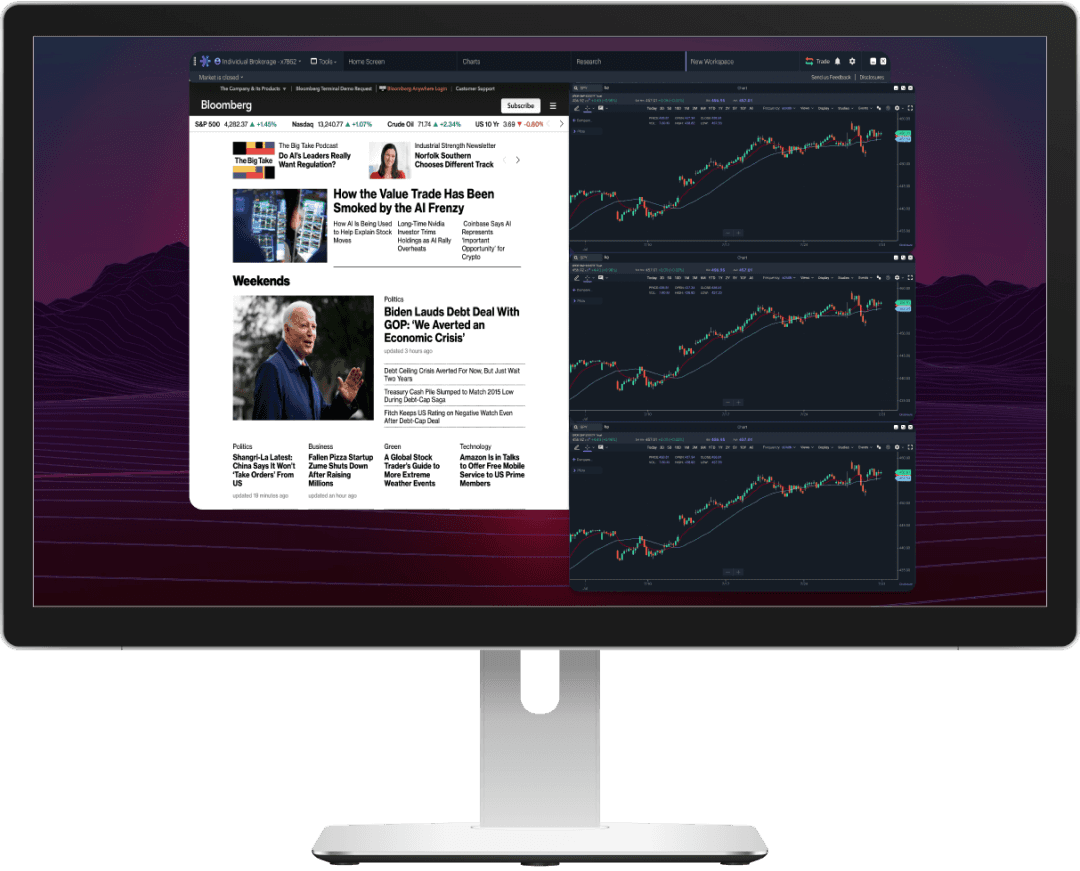
Testing sessions involved users creating trading setups that involved several other desktop programs

The intent was to “explode” apart the windows, giving the user complete control over arranging tools across different numbers of displays and configurations, allowing complete customization over how they wanted to arrange their setup to match their trading needs. Additionally, this freeform approach followed observed user behavior as it now allowed the user to set up trading tools independently to “mingle” around other programs they might be using concurrently. What we found during our contextual inquiry was that most traders resized and arranged windows of the active trading platform with other applications in order to multi-task with multiple sources of information while trading, this included web browsers, other technical analysis platforms, excel, and more.

The intent was to “explode” apart the windows, giving the user complete control over arranging tools across different numbers of displays and configurations, allowing complete customization over how they wanted to arrange their setup to match their trading needs. Additionally, this freeform approach followed observed user behavior as it now allowed the user to set up trading tools independently to “mingle” around other programs they might be using concurrently. What we found during our contextual inquiry was that most traders resized and arranged windows of the active trading platform with other applications in order to multi-task with multiple sources of information while trading, this included web browsers, other technical analysis platforms, excel, and more.

Ideate, Iterate, Prototype, Test

Next steps were to create a responsive chrome and filter bar for all the tool windows. On the web experience, the navigation bar included a global symbol search and account selector to navigate content on the platform pages. On desktop, we wanted to give users the ability to refine the symbol or account they were interacting with on a window-by-window basis instead of a global selection.

A new chrome was designed for each window that integrated the symbol search and/or account selector to drive the window content in addition to “table stakes” for independent windows - controls (close, minimize, maximize), as well as active/inactive states 


We also designed a new “slim” version of the quote bar on trading pages and integrated it into the filter controls we inherited; then new responsive views were created for the quote bar and filters (web platform at this point contained little to no responsive behavior). Prototypes of the responsive tools were made to test, validate, and iterate with users that the overflow patterns were meeting their expectations.
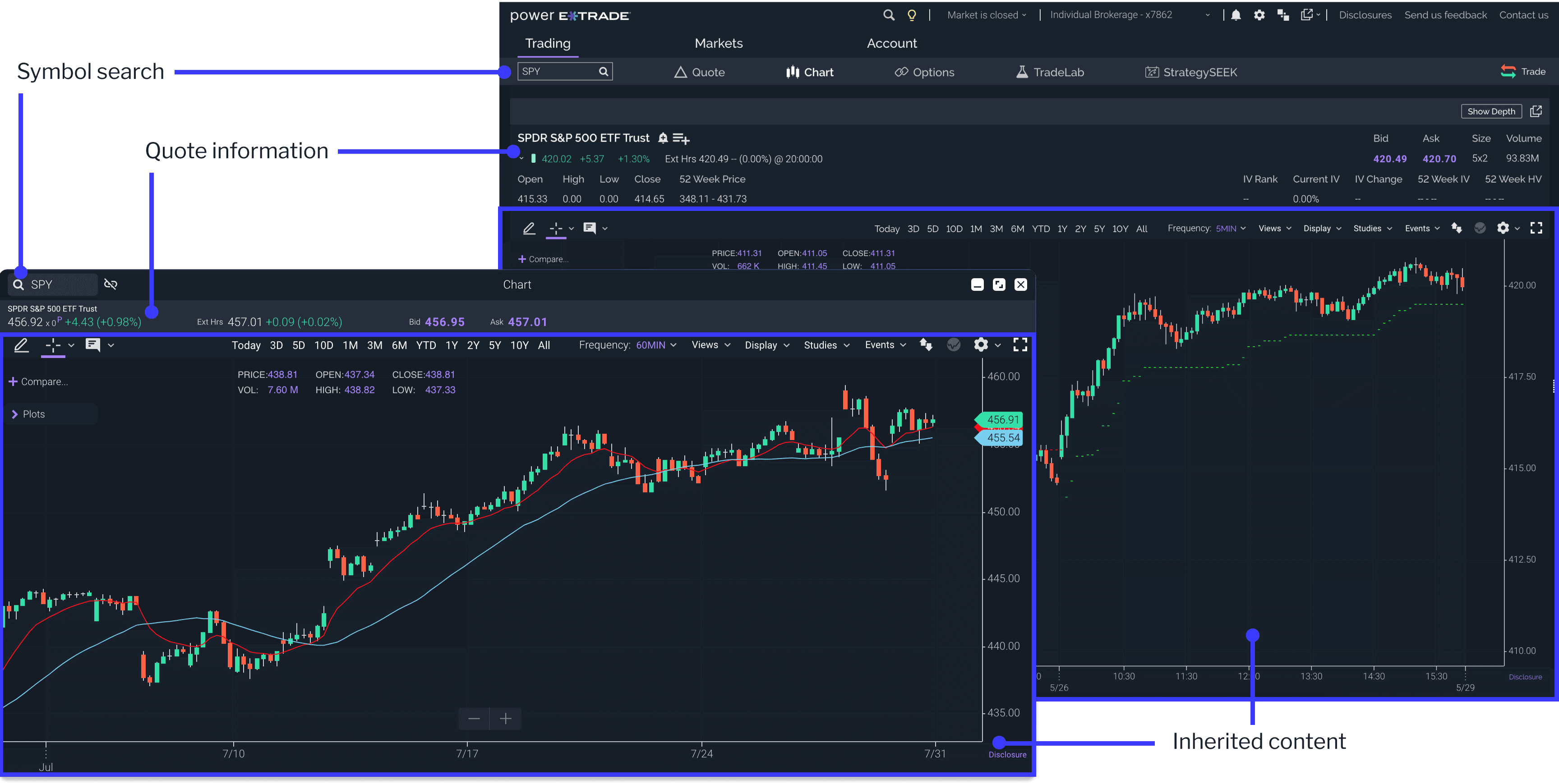
Responsive behavior for the menu bar, chrome, and secondary nav bar

Impact

Designing the base experience of the platform and validating that we could make such a concept into a working reality was the foundation that we could build the rest of the E*Trade desktop experience on top of. While the platform was still very far away from achieving all of the features and tools that were necessary for a full public launch, having a working MVP in production allowed us to onboard internal and external alpha users to start interacting with the experience and making real trades.

While working on designs and prototypes for other features, we conducted feedback sessions (user interviews / contextual inquiries) with stakeholders and clients on the MVP experience. Having a working platform allowed us to gain valuable insights into the user journey that prototyping was not able to flush out, and this proved crucial as we continued to evolve on the next stages of our roadmap.
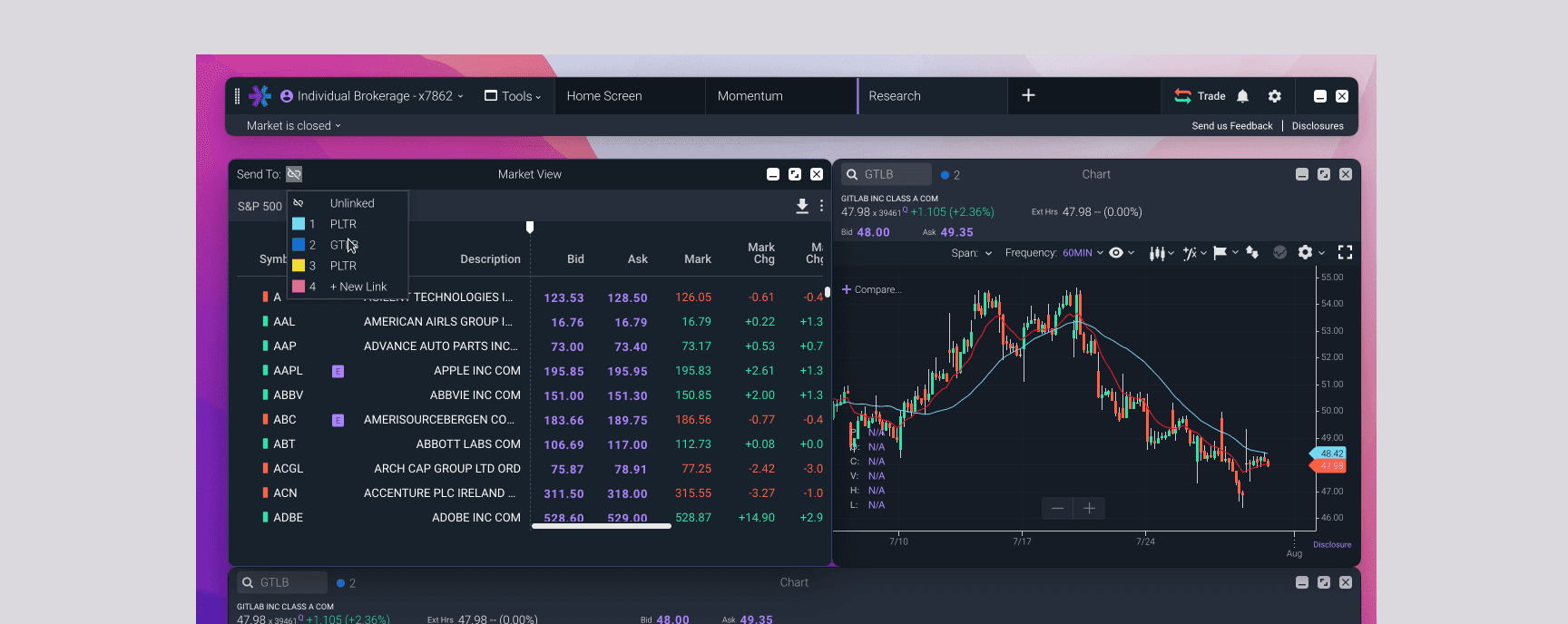
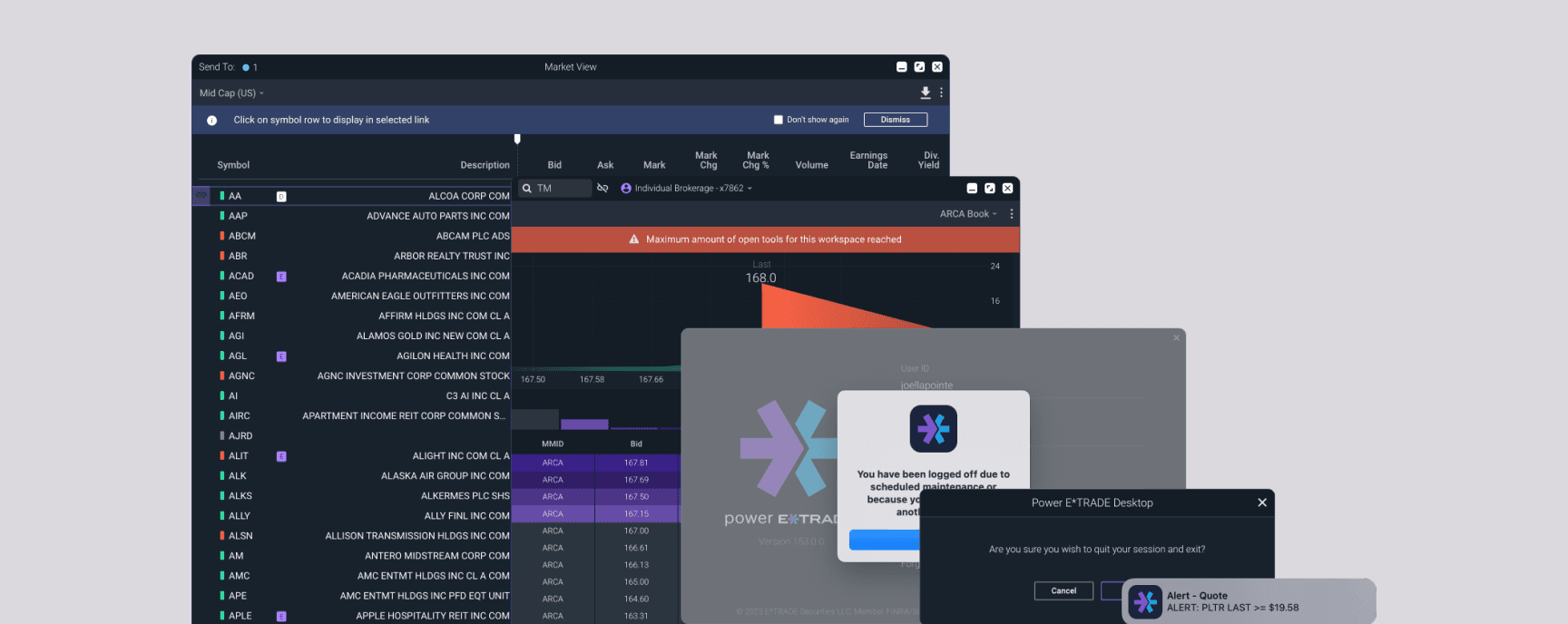
Helping active traders view a company’s symbol information across a network of connected tools

Helping active traders view a company’s symbol information across a network of connected tools

Helping active traders view a company’s symbol information across a network of connected tools

Creating a frictionless and intuitive set of guardrails to helping traders accomplish their tasks

Creating a frictionless and intuitive set of guardrails to helping traders accomplish their tasks

Creating a frictionless and intuitive set of guardrails to helping traders accomplish their tasks

© 2023 YLSCLLC

© 2023 YLSCLLC

© 2023 YLSCLLC